Buyer and seller pipelines
Switch between Buying and Selling and filter by stage. Buyer stages include consultation, searching, offer, and under contract; seller stages include preparation and listed.
A clear path from opportunity to closing.
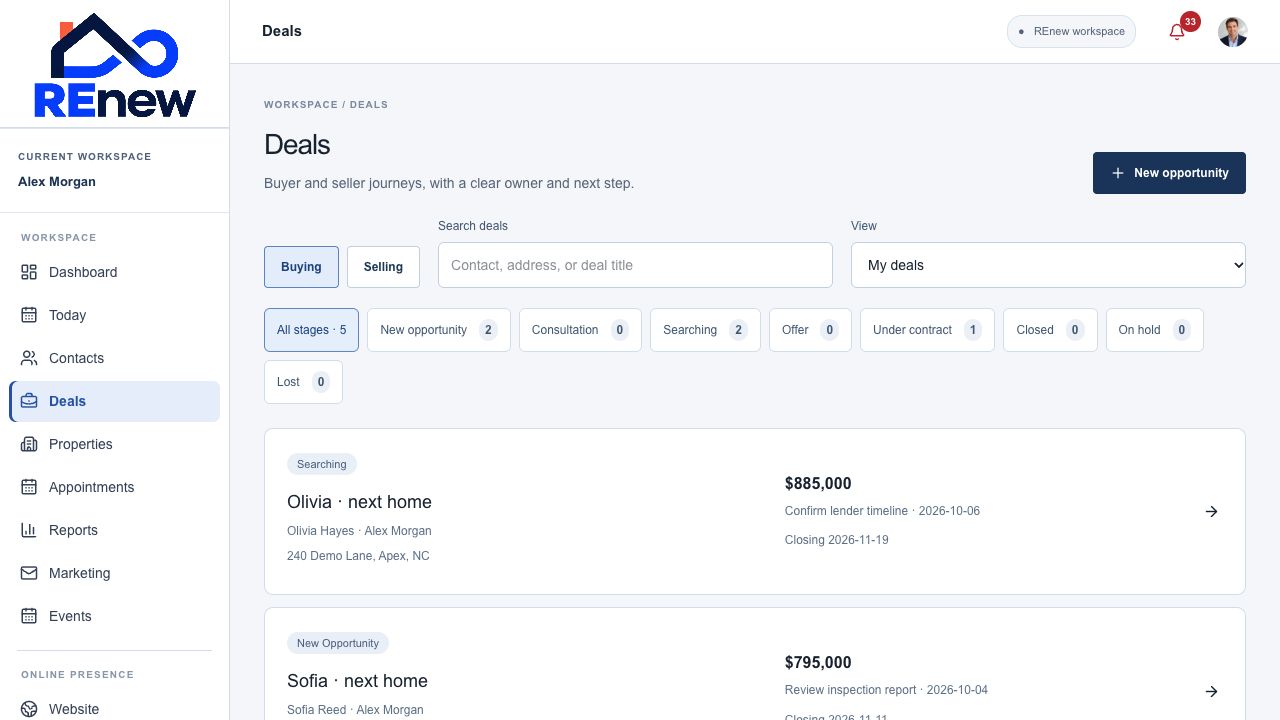
Follow buyer and seller journeys with a linked contact, responsible agent, property context, expected business, and a next action.
Switch between Buying and Selling and filter by stage. Buyer stages include consultation, searching, offer, and under contract; seller stages include preparation and listed.
Save a title, linked client, assigned agent, property address, target price, expected commission, closing date, and notes.
Search deals and choose your opportunities or the workspace view where your role allows it.
Link a follow-up and due date to the deal so the next step appears in the daily workspace.
Add checklist items, edit deadlines, and record completion. Due deadlines appear in Today.
Keep transaction participants, their roles, companies, contact details, and notes with the opportunity.
Organize named document links by category alongside transaction notes.
Keep deal creation and meaningful changes visible in the linked contact’s activity history.
Record progress, put an opportunity on hold, or mark it Closed or Lost.
Create an opportunity from a contact.
Set its stage, expected closing, and next action.
Work through deadlines and record the outcome.