CRM business and website reports
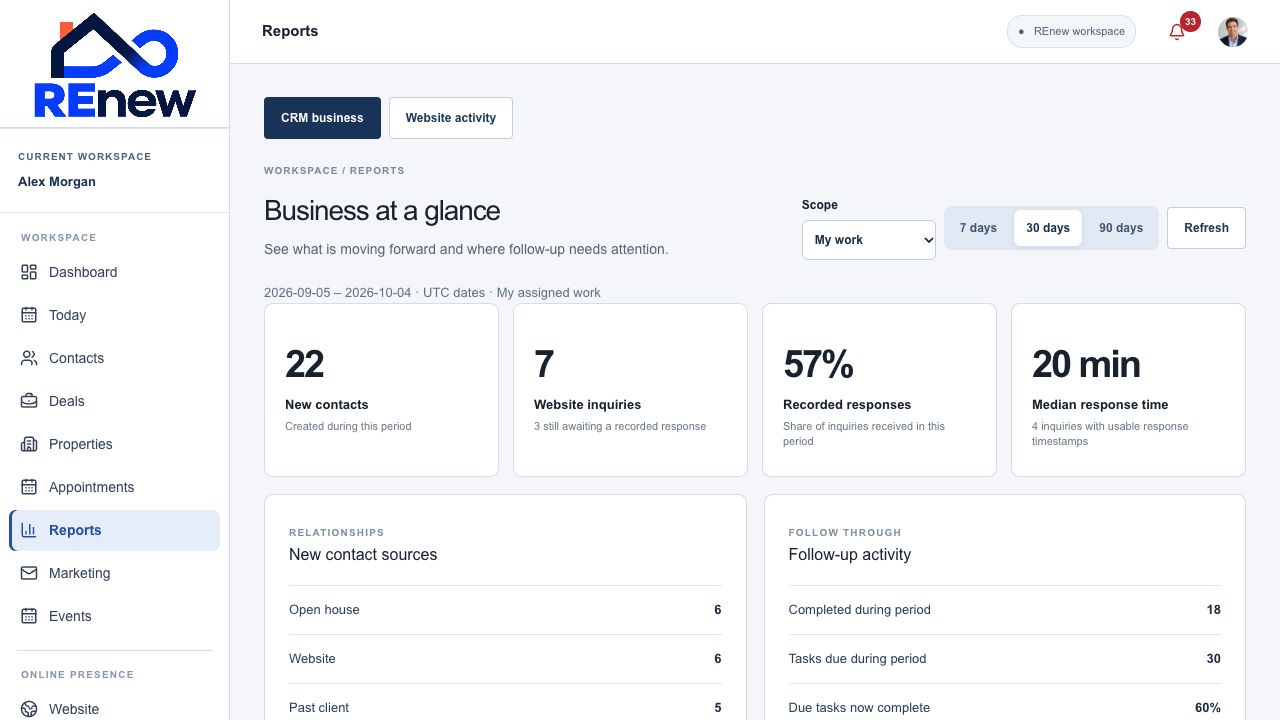
Switch between relationship and business reporting and your website analytics.
See the work. Understand the momentum.
Review CRM performance and website activity with clear time windows, scope, and definitions.
Switch between relationship and business reporting and your website analytics.
Choose 7, 30, or 90 days and your work or the workspace view where authorized. Refresh when needed.
See newly created contacts, website inquiries, recorded response share, and median response time for usable timestamps.
Review the saved sources of new contacts to understand where recent relationships began.
See completed follow-ups, tasks due during the period, work still open, and overdue tasks.
Review completed follow-up activity across the selected reporting period.
See opportunities by buyer or seller stage and outcomes for deals opened during the reporting window.
Review active deals, saved target values, expected commissions, and opportunities missing a commission estimate.
Explore visits, page views, pages, referral sources, campaigns, and device context recorded by the website analytics.
Choose a reporting period and scope.
Review inquiry response, follow-through, and pipeline.
Open the relevant workflow to act on what you learn.